The short answer
A kids' game should only ask for permissions that match what it actually does. Voice chat needs the microphone, but a puzzle or colouring game doesn't need your contacts or location. On Android 12 and up, the Privacy dashboard shows which apps have used each permission11, and you can revoke anything that doesn't add up10.
- What is the Privacy dashboard?
- An Android 12+ screen that shows which apps have used permissions like the camera, microphone and location.
- What is Data safety?
- The section of a Google Play listing where the developer declares what data the app collects and shares.
What each permission lets a game do
| Permission | What it lets the game do | ✓ Usually fine when | ! Ask why when |
|---|---|---|---|
| Camera | Take photos or record video | The game scans a code to add a friend | A puzzle or colouring game asks for it |
| Microphone | Record sound, from your child's voice to whatever's nearby | The game has voice chat | There are no voice features |
| Contacts | Read everyone in your child's address book, not just other players | Rarely, if ever, for a game | Almost always |
| Location | See where your child is and, with "Allow all the time", keep tracking in the background10 | The game is built on real-world places | It's a simple game, or it asks for "All the time" |
Key facts
Free to quote, with a link to this page
- 135
apps used by children aged five and under were reviewed by the University of Michigan in 2018: 11 asked for microphone access, 9 for the camera and 6 for location12.
Source: Michigan Medicine, 2018
- 12+
On Android 12 and up, the Privacy dashboard shows which apps have used permissions like the camera, microphone and location11.
Source: Android Help
- Always
With location set to "Allow all the time", an app can keep tracking where your child is in the background10.
Source: Android Help
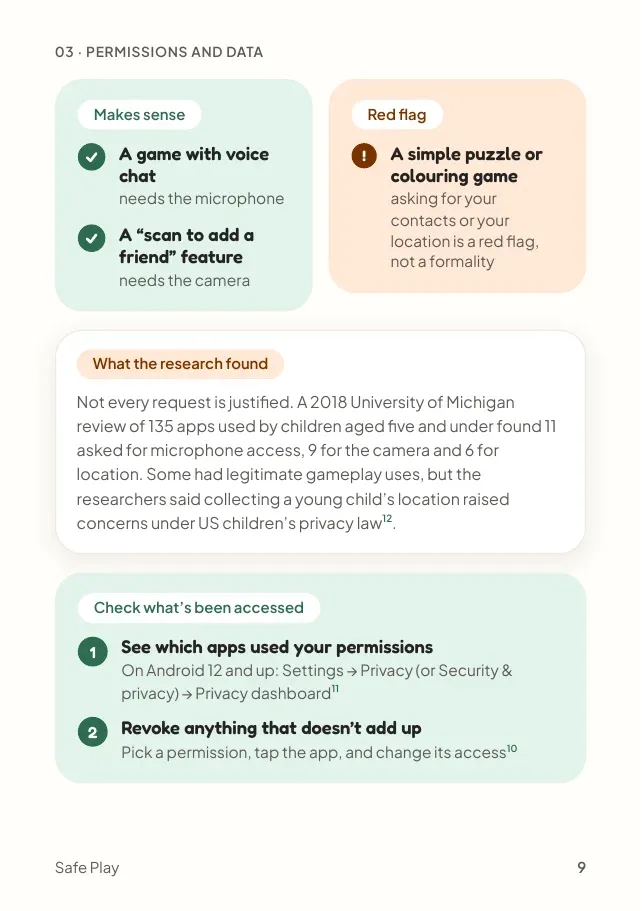
The one question: does it match what the game does?
Puzzle or colouring
- Camera! Ask whyAsk what the game uses it for before you allow it.
- Microphone! Ask whyAsk what the game uses it for before you allow it.
- Contacts! Ask whyRarely, if ever, needed by a game.
- Location! Ask whyAsk what the game uses it for before you allow it.
Has voice chat
- Camera! Ask whyAsk what the game uses it for before you allow it.
- Microphone✓ Makes senseVoice chat needs it to hear your child.
- Contacts! Ask whyRarely, if ever, needed by a game.
- Location! Ask whyAsk what the game uses it for before you allow it.
"Scan to add a friend"
- Camera✓ Makes senseScanning a code needs it.
- Microphone! Ask whyAsk what the game uses it for before you allow it.
- Contacts! Ask whyRarely, if ever, needed by a game.
- Location! Ask whyAsk what the game uses it for before you allow it.
Built on real-world places
- Camera! Ask whyAsk what the game uses it for before you allow it.
- Microphone! Ask whyAsk what the game uses it for before you allow it.
- Contacts! Ask whyRarely, if ever, needed by a game.
- Location✓ Makes senseThe game is built on where you are. Choose "While using the app", never "All the time".
A starting point, not a verdict. If something doesn't add up, check the Data safety section on the game's Google Play listing.
A request that doesn't match the game is a red flag, not a formality.
What the research found
Not every request is justified. A 2018 University of Michigan review of 135 apps used by children aged five and under found12:
Some had legitimate gameplay uses, but the researchers said collecting a young child's location raised concerns under US children's privacy law12.
Check what's been accessed in 2 steps
See which apps used your permissions
On Android 12 and up, the Privacy dashboard shows which apps have used each permission11.
Where to find it: Settings, Security and privacy, Privacy dashboard
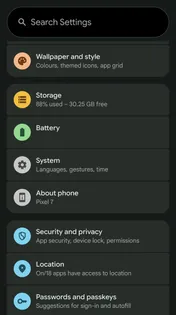
1Open Settings, then Security and privacy
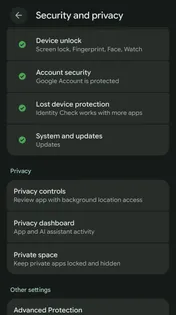
2Under Privacy, tap Privacy dashboard
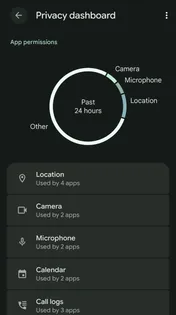
3Tap a permission to see which apps used it
Real screens from our own phone: Pixel 7, Android 17, checked 15 October 2026. On some phones the menu is called Privacy instead. Revoke anything that doesn't add up
Pick a permission, tap the app, and change its access10.
Before you install: the Data safety section on a game's Google Play listing shows what it says it collects and shares. Check it matches what the game does.
Myth vs fact
What parents often hear, checked against the sources
Myth
“If a game asks for a permission, it must need it.”
Fact
Not every request is justified. In a 2018 review of 135 apps used by children aged five and under, 6 asked for location12.
The most important part
Everyone taps Allow. Make it a two-second pause instead.
Permission pop-ups appear at the exact moment your child wants to play, so tapping Allow is what almost everyone does, adults included. That's not a failing. The fix is a habit, not a lecture.
Teach the one question: does this permission match what the game does? It's simple enough for a seven-year-old, and it works on every app they'll ever install.
Turning it into a habit
A few ways to make the question stick:
Why do you think a colouring game wants to know where we live?
Turn it into a puzzle. Children are good at spotting things that don't add up.
If a game asks for something new, bring it to me first.
A family rule, framed as a team plan, not a punishment.
Shall we look at what your apps can see?
Open the Privacy dashboard together. It's eye-opening for adults too.
Put it into practice
Actions you can take now
Everything this chapter covers, as a short to-do list you can work through now, while it's fresh.
Quick wins, a few minutes each. Tick them off as you go.
0 of 4 done
Common questions
What permissions should a children's game need?
Only ones that match what the game does. Voice chat needs the microphone and a "scan to add a friend" feature needs the camera. A simple puzzle or colouring game asking for contacts or location is a red flag.
How do I see which apps have used the camera or microphone?
On Android 12 and up, go to Settings → Privacy (or Security and privacy) → Privacy dashboard. It shows which apps have used each permission11.
How do I remove a permission from an app?
Pick the permission in your device's settings, tap the app, and change its access10.
What does "Allow all the time" location mean?
It lets an app keep tracking where your child is in the background, not just while the game is open10.
Should a kids' game ask for location?
Rarely. A 2018 University of Michigan review of 135 apps used by children aged five and under found 6 asked for location, and the researchers said collecting a young child's location raised concerns under US children's privacy law12.
Sources
- Android Help, Change app permissions on your Android phone · support.google.com
- Android Help, Manage permissions from the privacy dashboard · support.google.com
- Michigan Medicine, Advertising in kids’ apps more prevalent than parents may realize (2018) · michiganmedicine.org
Page updates
- Chapter 03 published as its own page, with real Privacy dashboard screens checked on 15 October 2026.