Know
- How "free" games really make their money
- What each "Allow" hands over, and which requests are red flags
- What an age rating tells you, and what it can't
Safe Play is a free, plain-English guide to child safety in Android games. By the end, you'll know how "free" games make their money, have the right settings switched on, and be ready if something goes wrong.
Your guide is on its way.
Short on time? Start with the checklist on page 33. Know a parent who'd want it too?

Every figure sourced, from
no tech degree required
It won't make games risk-free.
It will mean you're no longer guessing.
The short version is here. The guide has the full steps, the menu paths and the sources.
Use Google Family Link to require your approval for every purchase9. In the Play Store, go to Payments and subscriptions → Purchase verification and choose Always, keeping biometrics off if your child's fingerprint is on the device16. Remove saved card details from their device, and check your Google Play purchase history now and then, because small repeated charges are easy to miss.
No. Family Link can approve installs, block an app entirely and set time limits5, but it can't switch off chat inside a game. Turn chat off, or limit it to "friends only", in the game's own settings before your child starts playing.
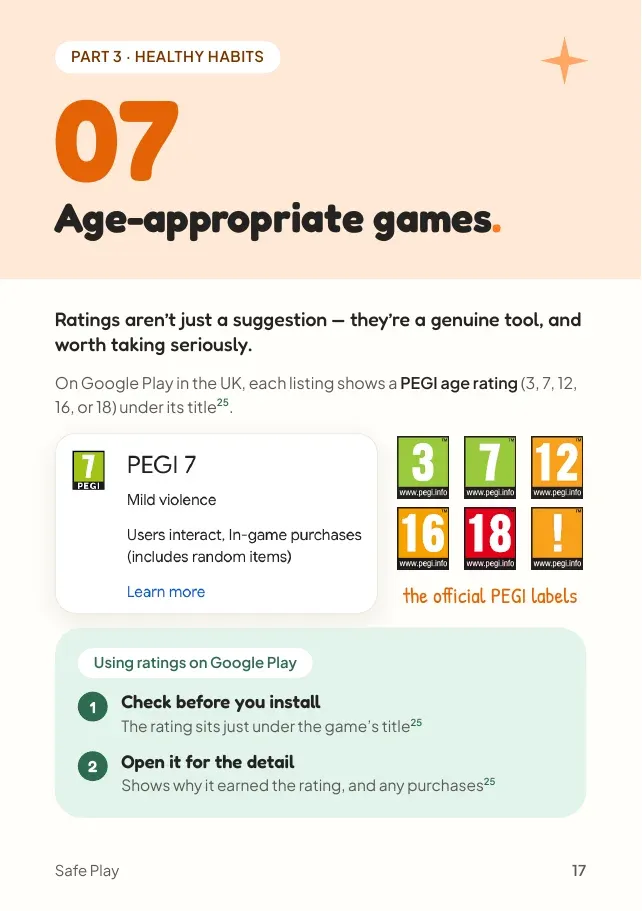
A PEGI rating (3, 7, 12, 16 or 18) sits just under the game's title on Google Play in the UK27. It reflects what's in a game, not how hard it is, and the content descriptors show why it earned that rating28. It can't tell you how well chat is moderated27, and ratings come from developers' own questionnaire answers30, so treat it as a starting point, not the whole story.
Design tricks that push players into choices they didn't mean to make. In 2022 the US FTC took action against Epic Games, maker of Fortnite, over dark patterns it said led players into unwanted purchases15, including a buy button placed so close to a preview button that one misplaced tap could buy an item19. Epic agreed to pay $245 million to fund refunds20.
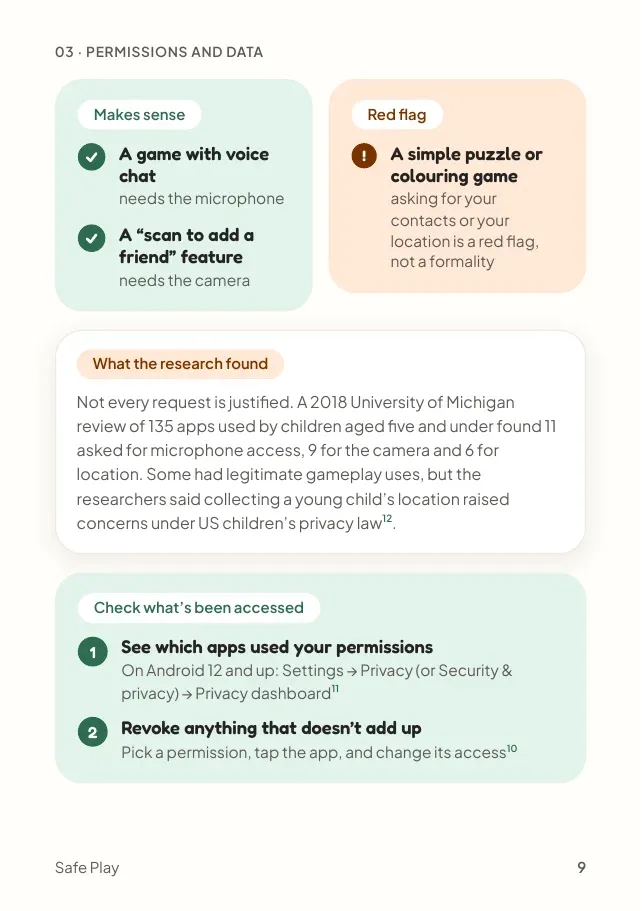
It usually shouldn't. A permission should match what the game does: voice chat needs the microphone, but a puzzle or colouring game asking for contacts or location is a warning sign, not a formality. On Android 12 and up, Settings → Privacy → Privacy dashboard shows which apps used each permission, and you can revoke anything that doesn't add up1011.
Call 999 if your child is in immediate danger. Report suspected grooming to CEOP at ceop.police.uk/safety-centre41. For bullying, hacking or general worry, call the NSPCC Helpline on 0808 800 5000, and children can call Childline free on 0800 11114142. For a purchase made without permission, find it in your Google Play order history and use Report a problem to ask for a refund as soon as you can43.
97%of 8 to 17-year-olds play games online
Ofcom, 20251
53%of those players spend money inside the games
Ofcom, 20251
1 in 3children who spend money online regret their in-game purchases
31%of 8 to 17s who game online chat with strangers while gaming
Ofcom, 20244
None of this means games are bad for children. Good ones can help them learn, solve problems and play together. But when a game isn't open about how it makes money, it helps to know what to look for. That's what this guide is for.
Many of today's games are built by teams whose job is to keep children playing, spending and chatting. Buying is made easy and hard to resist, chat is often switched on by default, and in Fortnite's case the US FTC says millions of players were tricked into unwanted purchases15.
Settings genuinely help, but none of them catch everything, and researchers found little support for relying on parental controls as a stand-alone safety strategy46. What makes a lasting difference is awareness, and being able to talk about it openly, without judgement.
What's this game actually like?
Be genuinely curious, not checking up. Ask them to show you how it works.
Shall we spot the tricks together?
Gems that hide real prices, timers that rush a choice. Spotting them is half the protection.
If anything feels weird, you can always tell me.
A message, a request, a purchase. Agree it before anything happens, so telling you feels normal.
If something has already happened
"You're not in trouble, and I'm glad you told me."
Many children delay telling a parent because they fear the reaction more than the problem45. Lead with reassurance, not blame. Games and tricks will keep changing. A child who knows they can come to you won't go out of date.

All 14 chapters in one 40-page PDF. Short on time? The checklist on pages 33–35 turns it into things to tick off, with a who-to-call card.
Download the free guide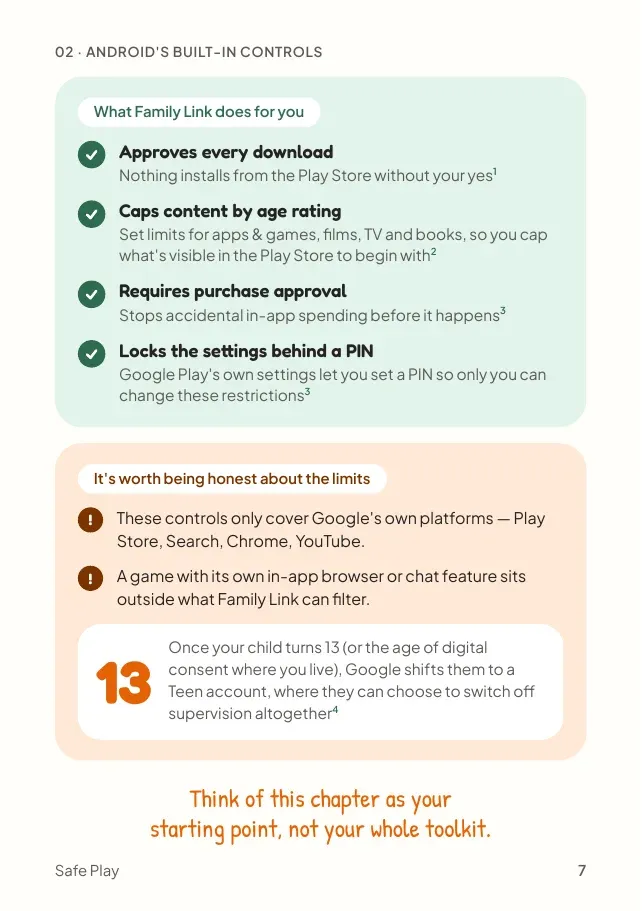
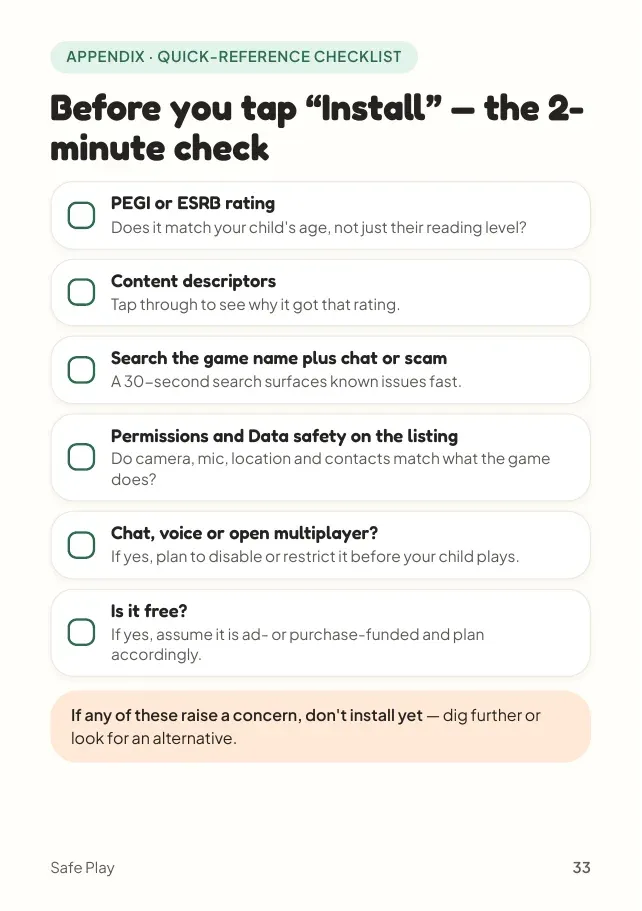
Straight from the guide's appendix. Think of the last game your child asked for and tick what you checked.
0/6
Most parents check one or two. The guide shows you what to look for in each.
If any of these raise a concern, don't install yet. Dig further or look for an alternative.
Get the full checklist (page 33)

"Everything in this guide is research, not opinion, except the last chapter."
Written by Drew Harding, a dad of two from Surrey and the founder of Pumpkin Cat Games. Every figure has a numbered source, from Ofcom, the NSPCC, the US FTC, PEGI and Google's own help pages.
Yes, it's completely free, and no, you don't need to give your email. There's no form, no account and no mailing list. Tap the button and the 40-page PDF downloads straight away.
Not at all. The problem is how many games are designed: to make spending easy, keep children playing and open them up to chat. The guide helps you understand those designs, set up what you can, and keep talking openly with your child without judgement.
The step-by-step settings are written for Android and Google Play. The chapters on in-app purchases, chat with strangers, dark patterns, red flags and talking with your child apply whatever device they use.
Yes. It was written for parents, not engineers. Settings come with the exact menu path, and if you're short on time the checklist on page 33 turns the whole guide into a list to tick off.
Fair question. Thirteen of the fourteen chapters are research and practical steps that work with any game. The last chapter is a personal note about why I built Pumpkin Cat Games, and you're welcome to skip it.
This is the 2026 edition, with sources from 2025 and 2026 where they exist. Settings menus do move as apps update, so if a screen looks different, search your device's settings for the feature by name.
Numbers match the guide, so source 15 here is source 15 in the PDF, which lists all 54.
Safe Play covers in-app purchases, chat with strangers, dark patterns, privacy settings, red flags and who to call, so you're no longer guessing.