The short answer
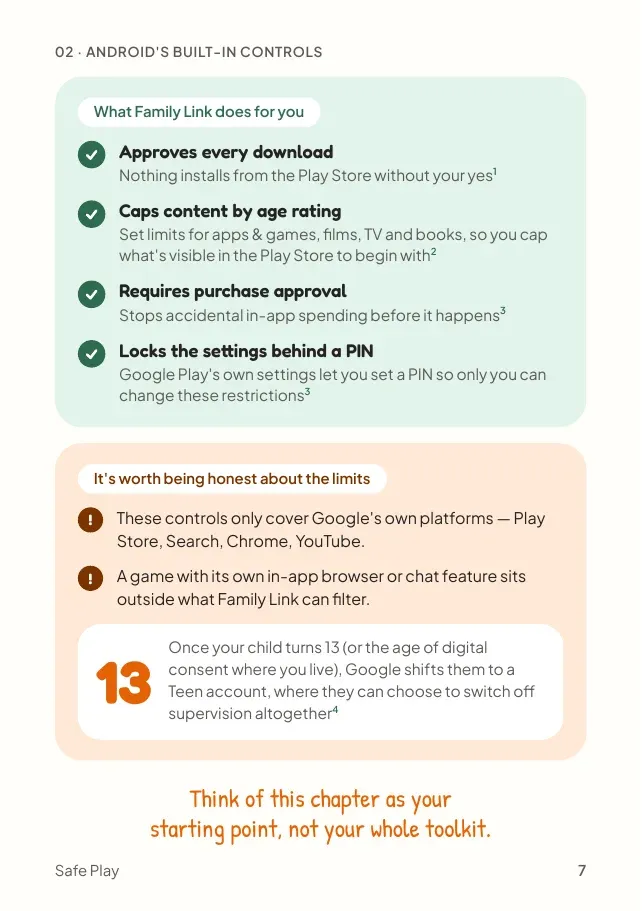
To control what your child downloads and buys on Android, link their Google account to yours with Google Family Link. Then approve downloads, cap content by age rating, require approval for purchases and set daily time limits5679. It's free and built by Google, but it can't switch off chat inside a game5, and its filters work mainly across Google's own services68.
- What is Google Family Link?
- Google's free parental controls app. Once your child's account is linked to yours, you can approve downloads and purchases, cap content by age rating and set time limits.
Set up Family Link for games in 4 steps
Each takes a few minutes, done once. Settings menus change as apps update, so if a screen looks different, search your device's settings for the feature by name.
Cap content by age rating
Set a top rating for apps and games, films and TV, though higher-rated titles may still show in search6.
Where to find it: Family Link, Controls, Google Play, Apps and games
Require approval for purchases
Every purchase, including inside games, waits for your approval9. It stops accidental spending before it happens. See the screens on a real phone.
Where to find it: Family Link, Controls, Google Play, Require approval for
The controls stay with you: for a supervised child, restrictions are changed from your account, not theirs6.
See it on a real phone: purchase approval in 3 taps
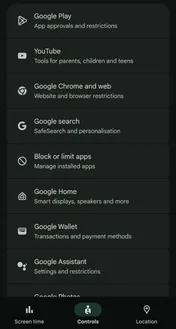
1Pick your child, open Controls, then tap Google Play
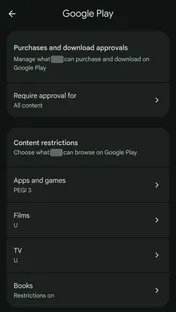
2Tap Require approval for. The age rating is set on this screen too.
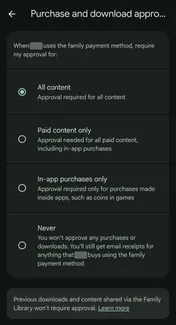
3Choose All content. Every download and purchase now waits for your yes.
Prefer fewer requests? Paid content only still asks before anything that costs money, including in-app purchases, but lets free downloads through9.
Looks different on your phone? Google updates Family Link from time to time. Search your settings for "purchase approvals".
Key facts
Free to quote, with a link to this page
- Free
Google Family Link costs nothing, and once your child's account is linked, Play Store downloads can need your approval before they install58.
Source: Google Families
- 13
At 13, your child can move to a supervised teen account. Until they're 18, they need your approval to stop supervision8.
Source: Google Families
- No
Family Link can't switch off chat inside a game. That has to be done in the game's own settings5.
Source: Google For Families Help
What Family Link can't do
| Task | Family Link |
|---|---|
| Approve every download | ✓ Yes59 |
| Cap content by age rating | ✓ Yes6 |
| Require approval for purchases | ✓ Yes9 |
| Set daily time limits | ✓ Yes7 |
| Turn off chat inside a game | ✕ No: use the game's settings5 |
| Filter a game's own in-app browser | ✕ No: filters work mainly across Google services68 |
| Keep supervision on after 13 | ✓ Yes: until 18, a teen needs your approval to stop it8 |
- Its content filters work mainly across Google's own services: the Play Store, Search, Chrome and YouTube68.
- A game's own chat or in-app browser sits outside what Family Link can filter. Turn chat off in the game itself (see chat and strangers).
- At 13, your child can move to a supervised teen account. Until they're 18, they need your approval to stop supervision8.
Think of Family Link as your starting point, not your whole toolkit.
Myth vs fact
What parents often hear, checked against the sources
Myth
“Family Link blocks chat inside games.”
Fact
It can approve installs, block an app entirely and set time limits, but it can't switch off chat inside a game5.
The most important part
Controls are a starting point. Trust is the toolkit.
Family Link is worth setting up. But it can't see inside a game's chat5, and researchers found children can and do bypass parental controls, with little support for relying on them as a stand-alone safety strategy46.
What keeps working is a child who understands why the settings are there, and knows they can come to you.
Setting it up together
Controls that are explained feel like care, not suspicion. A few ways in:
Let's set this up together.
Show them what each setting does and why. They'll be less tempted to work around something they understand.
If something gets blocked that you think is fine, ask me.
An approval request is a chance to talk, not a wall.
As you get older, we'll loosen these together. What would you change first?
Plan the handover early, so growing up is a conversation, not a cliff edge.
Put it into practice
Actions you can take now
Everything this chapter covers, as a short to-do list you can work through now, while it's fresh.
Quick wins, a few minutes each. Tick them off as you go.
0 of 4 done
Common questions
Is Google Family Link free?
Yes. Family Link is free and built by Google8. It lets you approve downloads and purchases9, cap content by age rating6 and set time limits7.
Can Family Link block chat inside a game?
No. Family Link can approve installs, block an app entirely and set time limits, but it can't switch off chat inside a game5. Do that in the game's own settings before your child starts playing.
What happens to Family Link when my child turns 13?
Your child can move to a supervised teen account. Supervision carries on, and until they're 18 they need your approval to stop it8.
Sources
- Google For Families Help, Manage your child’s Google Play apps · support.google.com
- Google Play Help, How to set up content restrictions on Google Play · support.google.com
- Google For Families Help, Set app time limits on your child’s device · support.google.com
- Google Families, Family Link FAQ · families.google
- Google For Families Help, Purchase approvals on Google Play · support.google.com
- Stoilova, M., Bulger, M. & Livingstone, S., Do parental control tools fulfil family expectations for child protection? A rapid evidence review of the contexts and outcomes of use (Journal of Children and Media) (2023) · tandfonline.com
Page updates
- Chapter 02 published as its own page, with real Family Link screens checked on 15 October 2026.