The short answer
On Google Play in the UK, most games show a PEGI age rating (3, 7, 12, 16 or 18) just under the title27. It reflects what's in the game, not how hard it is: tap it to see the content descriptors, such as Violence, Bad Language, Fear or Gambling28. You can cap the rating in Family Link6. Developers rate their own games30, so treat it as a starting point.
- What is PEGI?
- The age rating system used in the UK and Europe: 3, 7, 12, 16 or 18, based on what's in a game.
- What is a content descriptor?
- A label like Violence, Bad Language, Fear or Gambling that shows why a game earned its rating.
Use ratings on Google Play in 3 steps
Check before you install
The PEGI rating sits just under the game's title27.
Cap the rating in Family Link
Set a top rating for apps and games, so what your child sees in the Play Store starts out age-appropriate6.
Where to find it: Family Link, Controls, Google Play, Apps and games

1The rating sits just under the title. Tap it for the detail.
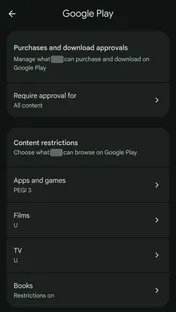
2In Family Link: Controls → Google Play → Apps and games
Real screens, checked 15 October 2026: our own Google Play listing, and our Family Link settings. Names hidden.
Key facts
Free to quote, with a link to this page
- 5
PEGI age ratings on Google Play in the UK (3, 7, 12, 16 or 18), shown under most games' titles27.
Source: Google Play Help
- 79%
of parents whose children play video games know the PEGI labels; 62% of those use a tool to limit play (2023, UK and three EU countries)29.
Source: PEGI
- Self-rated
Google Play ratings come from developers' own answers to a questionnaire when they publish, and can change after review30.
Source: Play Console Help
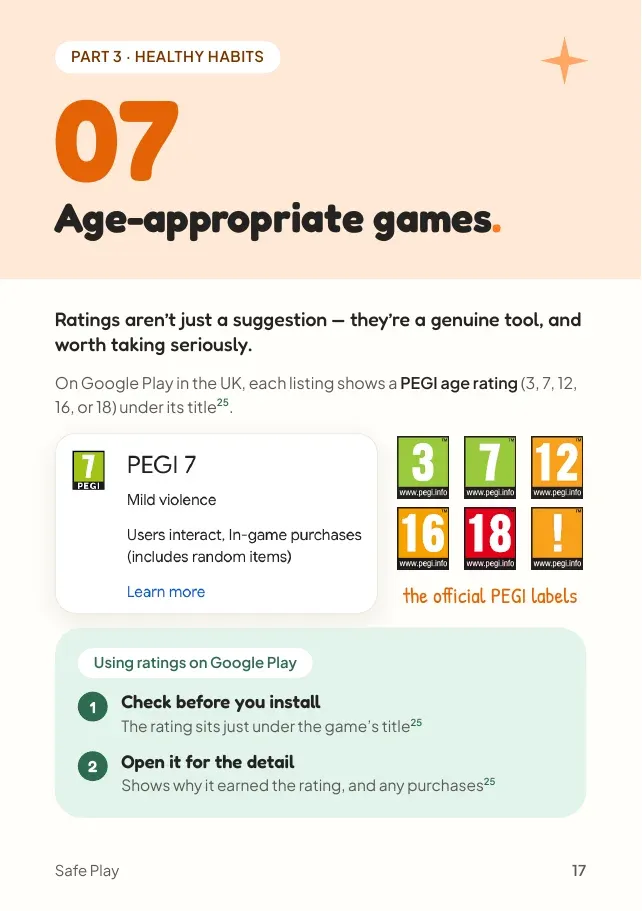
A rating reflects what's in a game, not how hard it is
Content descriptors, such as Violence, Bad Language, Fear or Gambling, show why a game earned its rating28.
Read the descriptor, not just the number
"Moderate violence" sits a step above "Mild violence" on a PEGI 7 listing. Same layout, different story.
"Parental guidance" instead of a number
Some listings say "Parental guidance" instead of an age. Treat it as a cue to look closer yourself.
ESRB in the Americas
In North and South America you'll see ESRB ratings instead (E, E10+, T, M, AO), which work on a similar principle27.
- 79%of parents whose children play video games know the PEGI labels; 62% of those use a tool to limit play (2023, UK and three EU countries)29
What a rating can't tell you
| Question | The rating |
|---|---|
| The age the content suits (3, 7, 12, 16 or 18) | ✓ Yes27 |
| Why it earned the rating | ✓ Yes: the content descriptors28 |
| How well chat is moderated | ✕ No: ratings don't cover features like chat27 |
| How hard the game is to put down | ✕ No |
| An independent check | ✕ No: developers answer a questionnaire30 |
- Ratings come from developers' own answers. They fill in a questionnaire when they publish, and ratings can change after review30.
- What a rating can't capture: how well chat is moderated, or how hard a game is to put down. Ratings don't cover features like chat27, so independent parent reviews help fill the gap.
A rating is a filter, not a verdict. The rest of this guide covers what it misses, from chat to dark patterns.
Myth vs fact
What parents often hear, checked against the sources
The most important part
A rating is where the conversation starts, not where it ends.
Children usually know exactly which games their friends are playing, rated or not. Saying no to a 16+ game is easier when your child understands why, and knows you've actually looked.
The right limit changes as children grow, so revisit it together as they get older.
Talking about ratings
A few easy ways in:
What's in that game that makes it a 12?
Look at the descriptors together. It's a fact-finding job, not a debate.
Show me what your friends are playing.
Curious, not judging. You'll learn what's coming before it's asked for.
Let's pick a limit and look at it again on your birthday.
A date to revisit makes a no feel less permanent.
Put it into practice
Actions you can take now
Everything this chapter covers, as a short to-do list you can work through now, while it's fresh.
Quick wins, a few minutes each. Tick them off as you go.
0 of 4 done
Common questions
What do PEGI ratings mean?
PEGI ratings (3, 7, 12, 16 and 18) show the age a game's content suits. They reflect what's in a game, not how difficult it is28.
Where is the PEGI rating on Google Play?
Just under the game's title on its Google Play listing27. Tap it to see the content descriptors that explain why it earned the rating28.
Who decides a game's rating on Google Play?
Developers, by answering a questionnaire when they publish, and ratings can change after review30.
What's the difference between PEGI and ESRB?
PEGI is used in the UK and Europe (3, 7, 12, 16, 18). ESRB is used in North and South America (E, E10+, T, M, AO). Both work on a similar principle27.
Can I block games above a certain age rating?
Yes. In Google Family Link you can set a top rating for apps and games, though higher-rated titles may still show in search6.
Sources
- Google Play Help, How to set up content restrictions on Google Play · support.google.com
- Google Play Help, Apps & Games content ratings on Google Play · support.google.com
- Nintendo UK, PEGI age ratings inform you at a glance · nintendo.com
- PEGI, Statistics about PEGI (Ipsos/GameTrack study for Video Games Europe) · pegi.info
- Play Console Help, Content rating requirements for apps, games, and the ads served on both · support.google.com
Page updates
- Chapter 07 published as its own page, with real Google Play and Family Link screens checked on 15 October 2026.